Introduction
At its heart, endofday is a workflow engine for docker containers. When we refer to a workflow, we mean an
orchestrated set of tasks or processes that together accomplish some larger objective. In the case of endofday,
the individual tasks are container invocations which means that virtually any Linux host can provide computational
resources in support of executing an endofday workflow. One of the great features of endofday is that you can easily
transition from executing your entire workflow on your personal machine, to executing part or all of it in a remote
cloud, freeing up your local resources for other tasks.
Each task within a workflow can have any number of inputs and outputs, and each input or output can be any file or directory. By defining the input of one task to be the output of another task, a dependency can be created between two tasks. The endofday engine analyzes the dependencies of all tasks within a workflow and executes the tasks in the proper order, running tasks in parallel when possible.
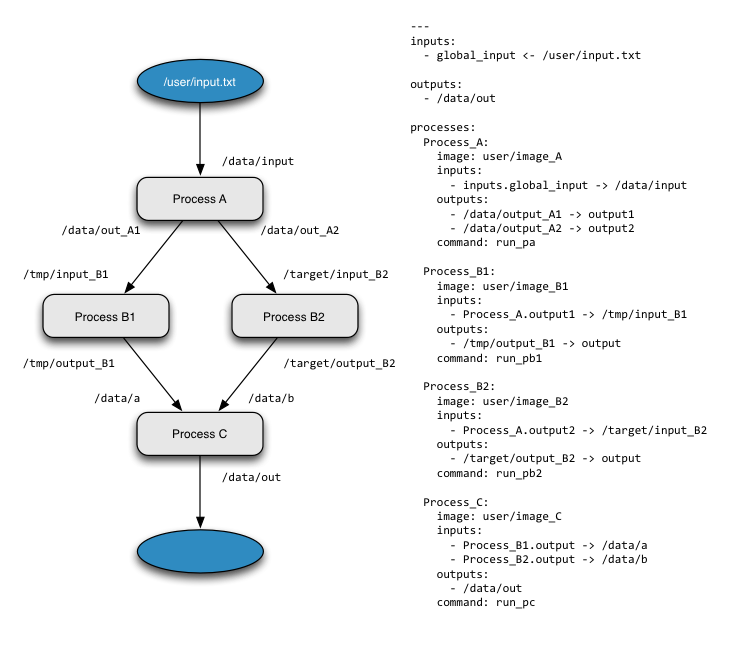
Workflows for endofday are defined in a text file using the YAML format. The YAML definition includes a description of each container that should be executed (the image, command to run, inputs and outputs) as well as the global inputs and outputs of the workflow. This makes endofday workflows very easy to share and distribute. Thanks to Docker, you can execute the same workflow from one host to the next by simply copying the yml file to the new host. No additional software installation is needed: if the images are not available locally, they will be pulled automatically from the Docker hub when endofday executes.
endofday also has first class support for data and applications registered within the Agave science-as-a-service platform, so data inputs and application assets do not need to reside on the same machine as endofday and applications do not have to be packaged into containers or even executed on hosts that can run Docker. To provide Agave support, endofday ships two additional Docker images that handle retrieving Agave URLs and submitting jobs, and the core engine provides two classes for executing these images when appropriate.
The Agave support is an indication of how easy it is to extend endofday to integrate other kinds of processes and workloads. Essentially, one only needs to wrap the process in a generic docker image and implement a class to be called by the main engine. Using this technique, it would be easy to provide support for other kinds of processes such as web service calls, for example.
By default, the endofday binary orchestrates the workflow execution synchronously and locally (even if the processes themselves are running on remote servers), logging messages to standard out during the execution. Alternatively, using your Agave credentials, you can execute an entire workflow asynchronously and remotely in Agave’s cloud. The outputs will be archived to a pre-configured storage system and you can even configure endofday to have Agave email you when the job completes.
In the tutorial we cover each execution mode by working through specific examples.